This document contains easy steps to kickstart the RollOver process for the next financial year
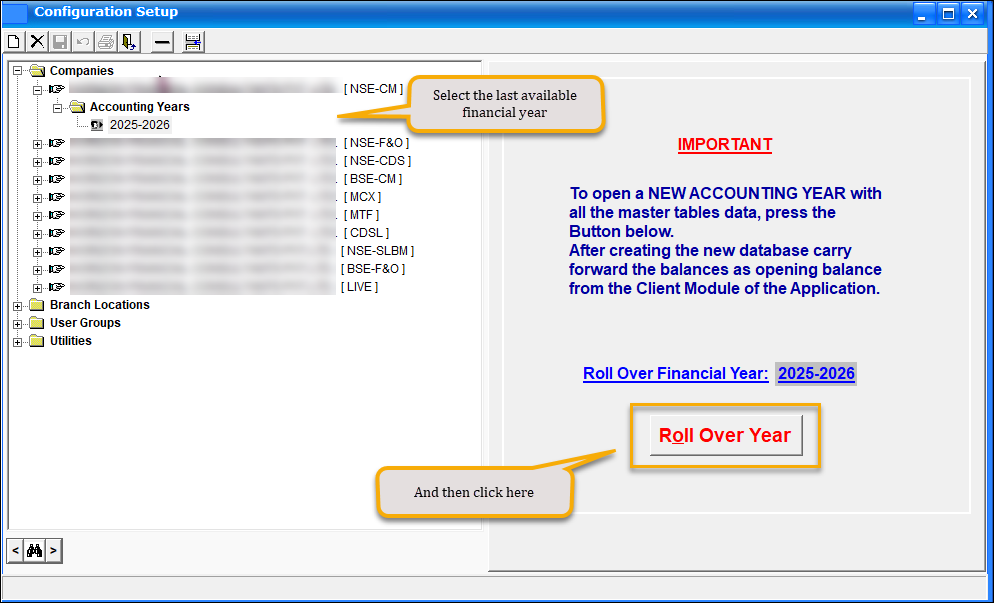
1. Run SHADMIN (SharePro Administrator software) and open the configuration setup. Expand the 1st company and select the last accounting Year in the list as shown in the image below. Click on the Rollover button to begin the process.
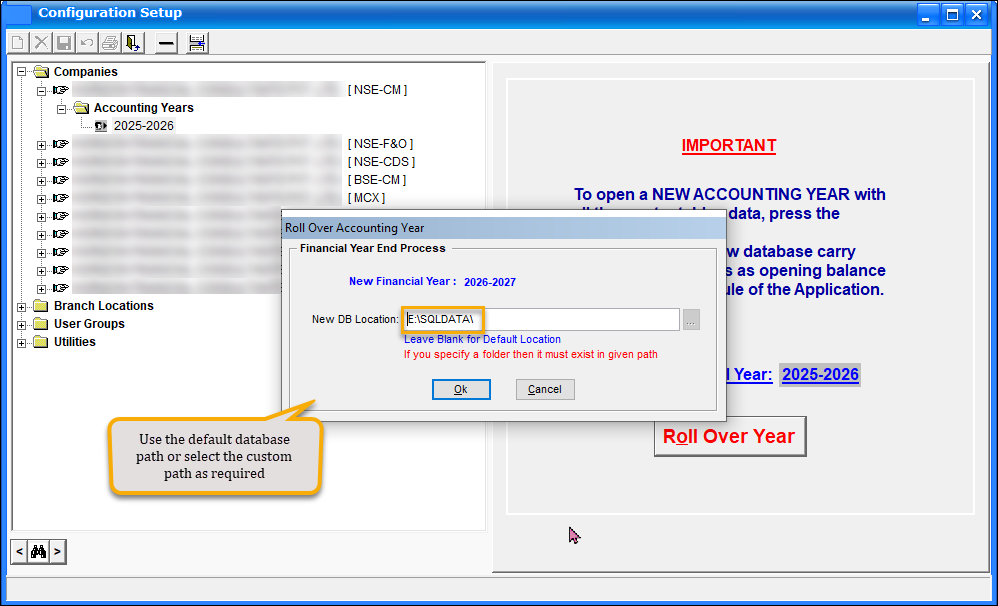
2. At this point, a new Dialog will appear which will allow you to change the location of the new database for 2026-2027. By default, it will contain the location of the current year’s database, and most likely, you do not need to change the location.
The Admin software may take a few minutes to create the New Database and migrate all the masters to the next financial year. Have patience and allow the routine to complete the process. Once completed, your new Database is ready.
Ok! If you have successfully reached here, the new database for 2026 – 2027 has been created and is ready to use.
Remember that a new MAIL database for 2026 – 2027 will be created and will be named as XXMAIL2627, where XX is the prefix for your databases and could be different for you. Make sure to include this database in your backup and maintenance plans.
Note: Sometimes, while creating the new Database, the system may throw some creation errors. Do not worry. This is only because some objects in the system are interdependent. In this case, once the rollover is done, we may have to run Database Update once more, and that’s all.